
Augmented reality sightseeing overlays narrated stories, historical images, or wayfinding cues onto the real landmarks in front of you, turning a plain walk past a monument into a guided, layered experience. It works best for place-centered storytelling, points-of-interest discovery, and making complex history easier to grasp on the spot. The catch is that the value depends almost entirely on how well the digital layer is integrated with the physical site and a human guide, not on how flashy the effects are.
TL;DR:
- AR sightseeing works best when the digital layer complements a live guide rather than replacing it, providing seamless storytelling integration.
- Short, focused POI interactions, lasting a few minutes each, outperform long screen-heavy sessions, especially in outdoor or landmark settings.
- Reliability and usability are key; apps should activate with one scan, offer offline mode, and have stable tracking to prevent distracting technical issues.
- Public AR tours favor brief, site-anchored interactions over immersive fully automated experiences, which research shows are less effective without human support.
- Using AR in crowded or historic sites requires safety precautions, such as pausing in safe spots and limiting continuous screen use to protect visitors and nearby guests.
Table of Contents
- How augmented reality shows up on sightseeing tours
- What to expect and how to prepare for an AR tour
- How to choose an AR tour or app for sightseeing
- Best practices for using AR while sightseeing safely and respectfully
- What research and major AR deployments reveal about sightseeing
- Why integrated, guide-led AR formats hold up in practice
- A half-day AR-enhanced route through Hollywood
- How VIP Hollywood Experiences brings AR-style storytelling to your visit
- FAQ
- Sources
How augmented reality shows up on sightseeing tours
AR sightseeing comes in a handful of recognizable formats, and knowing which one you’re using helps you set the right expectations.
Marker or QR-triggered AR asks you to scan a code at a specific spot, which then plays a short video, animation, or audio clip tied to that exact location. Geolocated point-of-interest (POI) overlays use your phone’s GPS to recognize where you are and surface relevant content automatically as you walk, common on outdoor heritage trails. Image and feature recognition points your camera at a building, painting, or statue and layers information once the app matches what it sees. Head-mounted displays (HMDs) go further, projecting a semi-transparent overlay directly into your field of view without a phone screen at all, though these remain rare outside museums and pilot projects.
Each format tends to cluster around certain venues:
- Museums and galleries favor image recognition and marker-based AR for artwork and artifacts, since the content can be tightly scripted to a fixed object.
- Outdoor walking tours and national parks lean on geolocated POI overlays, since visitors move along trails or sidewalks rather than standing in front of a single piece.
- Theme parks and some city landmark tours experiment with HMDs for short, high-production scenes.
The National Park Service runs a self-guided AR walking tour at the New Philadelphia historic site, where an 11-stop, quarter-mile trail uses short POI interactions, typically a few minutes each, to tell the story of a town founded by a formerly enslaved man. The Smithsonian took a similar approach with Unhidden Heroines on the National Mall, where five short AR experiences bring historical women to life at existing monuments, each one activated by a QR scan and running about five minutes.
What to expect and how to prepare for an AR tour
Most AR sightseeing experiences follow a predictable sequence, and knowing the steps ahead of time saves you from fumbling with your phone at the worst moment.
- You scan a QR code or marker posted at the site, or open the tour app and let it detect your GPS location.
- The app requests camera and location permissions, then loads the relevant scene or audio layer.
- A short prompt or on-screen cue tells you where to point your camera or where to stand.
- The AR content plays, usually video, narration, or an animated overlay lasting a few minutes.
- The app either prompts you to the next stop or waits for you to move on.
Device requirements matter more than most visitors expect. Camera and GPS use drain battery fast, so a full charge before you leave, plus a portable charger, is worth the extra bag space. Data use adds up too: practical guidance for AR sightseeing recommends downloading offline content or maps in advance wherever the app supports it, since cellular dead zones around older buildings or dense urban cores are common.
Pacing varies by format, but individual POI interactions on public AR tours generally run just a few minutes each, with full self-guided routes taking anywhere from 30 to 45 minutes depending on the number of stops, consistent with the New Philadelphia trail example.
Pro Tip: Put your phone in airplane mode with Wi-Fi on between stops if the app allows it; you’ll still get app functionality without constant cellular drain.
A simple checklist before you head out: a fully charged phone, a portable charger, earbuds for audio narration, and any offline maps or content downloaded over Wi-Fi beforehand.
How to choose an AR tour or app for sightseeing
The temptation is to judge an AR tour by how impressive its visual effects look in a promo video. That’s the wrong metric. The better question is whether the digital layer actually fits the place and the story being told.
- Phygital integration: look for tours where the AR content complements a live guide’s script rather than replacing it entirely, since combining both tends to outperform either alone.
- Usability and reliability: a good app activates with one scan or tap, keeps tracking stable as you move, and offers some offline mode for spotty connections.
- Content quality: narration should build a coherent story across stops, not just drop disconnected facts, and historical claims should be sourced rather than generic.
- Language options: multilingual audio matters for international travelers and families with mixed language needs.
- Accessibility features: captions, audio-first options, and adjustable text size make a meaningful difference for visitors with vision, hearing, or cognitive differences.
- Cost and group fit: check whether the experience works for your group size and whether devices are provided or you need your own.
Research on mobile AR storytelling backs this prioritization. A usability and user experience study published in Virtual Reality found that keeping interfaces simple and foregrounding content, rather than piling on interactive features, is what keeps visitors engaged without raising their mental workload. Clunky navigation or confusing prompts pull attention away from the actual site, which defeats the purpose of an AR layer meant to deepen your connection to it.
Before booking a tour that leans heavily on AR, it helps to read up on how to choose Hollywood tours that wow, which covers similar decision points for in-person guided experiences layered with multimedia content.
Best practices for using AR while sightseeing safely and respectfully
AR sightseeing works best when you treat your screen as a brief lens, not a constant companion.
- Pause at a safe spot, away from foot traffic, stairs, or curbs, before you lift your phone to activate an overlay.
- Never walk while staring at your screen; AR content is meant to be viewed stationary, then set aside.
- Close background apps before you start a tour segment to save battery and reduce lag.
- Keep a portable charger on hand and consider airplane mode between POIs to stretch your data and battery.
- Follow posted signage and staff directions, especially at historic sites or crowded landmarks where AR use might be restricted in certain areas.
- Choose audio or haptic cues over constant screen-watching when the app offers them, since this keeps your eyes up and aware of your surroundings.
Respect for other visitors matters too. Standing in a doorway or blocking a walking path to finish a video ruins the experience for everyone behind you.
Pro Tip: If you’re visiting with someone who finds new interfaces frustrating, let one person in your group run the app while others simply listen and watch, then swap roles at the next stop.
Accessibility deserves a specific mention. Visitors with mobility, vision, or cognitive differences often benefit from bringing a companion who can manage the technical side of activation while they focus on the experience itself, and many public AR tours now build in audio-first options for exactly this reason.
What research and major AR deployments reveal about sightseeing
The strongest evidence on AR sightseeing points in one consistent direction: integration beats intensity.
A field quasi-experiment with 135 visitors compared three formats: a traditional guided tour, a non-integrated AR overlay, and a semi-immersive, QR-triggered AR experience paired with a live guide. The guide-integrated AR format scored highest across all 13 experience dimensions measured, including satisfaction and intent to return, beating both the traditional tour and the standalone AR app. That finding reframes the question from “how advanced is the AR” to “how well does it work alongside a human narrator.”
A separate comparative field study in Fez, Morocco, involving 40 users, found that mobile AR improved how enjoyable visitors found their trip and how easily they located monuments compared with a standard 2D map, though the researchers flagged ongoing usability concerns and room for the technology to mature.
Common threads across these studies and public deployments:
- Semi-immersive formats that keep a human guide in the loop consistently outperform fully automated or disjointed AR.
- Usability problems (confusing prompts, unstable tracking) raise mental workload and pull focus away from the actual site.
- Short, focused POI interactions, a few minutes each, work better than long, screen-heavy segments.
Public institutions have embraced this model. The National Park Service’s self-guided tour and the Smithsonian’s monument-based AR experiences both rely on brief, site-anchored interactions rather than marathon virtual sessions, reinforcing what the field research suggests: less screen time, more context, works.
Why integrated, guide-led AR formats hold up in practice
Years spent walking Los Angeles streets with visitors, pointing out which hillside the Hollywood Sign actually sits on or which gate belongs to which studio, shape a simple conviction: the best technology on a tour supports the story a guide is already telling, it doesn’t compete with it. That’s the same conclusion the field research above reaches independently.
Our own tours layer onboard video content, multilingual audio guides, and interactive storytelling around a live guide’s narration rather than asking you to choose between a human and a screen. The goal mirrors what the semi-immersive research found most effective: digital content that reinforces what you’re already seeing out the window, not a separate experience competing for your attention.
That combination, a live narrator plus well-timed multimedia, tends to hold visitor interest better than either a silent AR app or an old-fashioned recorded audio loop played on repeat. It’s a small operational choice with an outsized effect on how memorable a sightseeing day turns out to be.
A half-day AR-enhanced route through Hollywood
A morning that blends guided storytelling with AR moments might run like this. We’d start at the Hollywood Walk of Fame around 9:00 AM, before crowds thicken, pausing at two or three stars tied to stories our guide fills in with onboard video. From there, a short drive takes us toward the Hollywood Sign viewpoint, where a QR-triggered clip on a tour tablet shows archival footage of the sign’s 1923 installation, layered right over the live view.
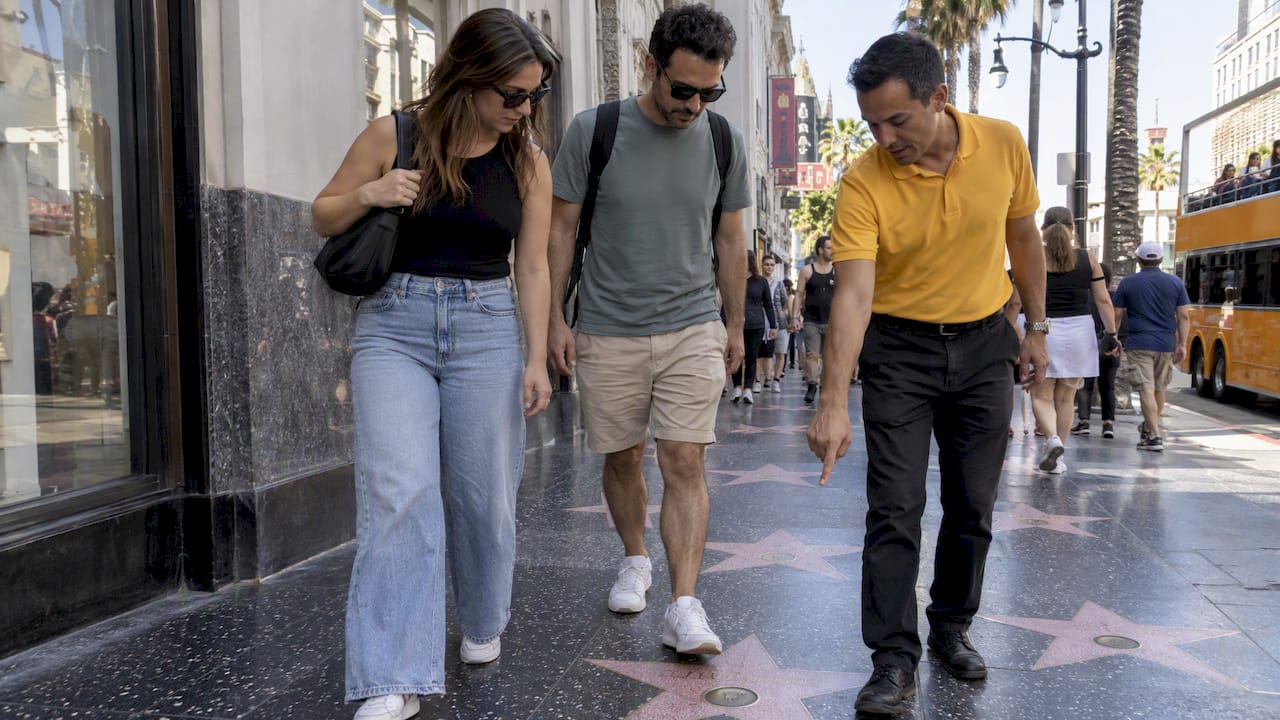
By late morning, we’d wind through celebrity home streets in Beverly Hills, where a guide’s live narration carries most of the storytelling and AR stays in reserve for one or two standout properties. Small groups make this pacing work: fewer than a dozen guests means everyone gets a window seat and a chance to ask questions instead of jockeying for a view.
For photo breaks, I’d suggest the Sign viewpoint and one celebrity home stop, both well-suited to a quick pause without breaking the day’s rhythm. Audio guides in multiple languages let mixed-language families follow along independently, so nobody’s stuck translating for the group.
— vincent
How VIP Hollywood Experiences brings AR-style storytelling to your visit
We built our Los Angeles tours around the same principle the research supports: digital content works best when it reinforces a live guide, not when it replaces one. Our small-group bus tours pair onboard video screens, multilingual audio guides, and augmented reality content with a local guide narrating in real time, so you get the context of a human storyteller and the visual punch of multimedia at the same stops.
What that looks like in practice:
- Interactive onboard video and audio layered over real landmarks, including the Hollywood Sign Tour and the Celebrity Homes Tour
- Audio guides available in multiple languages for international groups and families
- Small-group and private booking options for a more personal pace, detailed in our guide to booking private sightseeing in Hollywood
- Exotic car drives and helicopter routes as add-on ways to see the city beyond the standard bus format
If you’re weighing how to get around during your visit, a mobility app like Halen can help you cover last-mile transport between tour pickup points without the guesswork of local transit.
Ready to see Hollywood with a guide and a screen working together instead of against each other? Book the Hollywood Sign Tour and start planning your route.
FAQ
How can augmented reality be used in tourism?
Augmented reality in tourism typically overlays narrated video, historical images, or wayfinding cues onto real landmarks, activated by scanning a QR code, pointing a camera at a feature, or simply walking into range of a GPS-tagged point of interest. Public examples include the National Park Service’s self-guided AR trail and the Smithsonian’s monument-based AR experiences.
What are the drawbacks of VR travel?
Virtual reality travel experiences require a dedicated headset, which limits where and how you can use them compared with phone-based AR, and they fully replace your view of the real surroundings rather than layering onto it. Usability research on related mobile AR storytelling tools notes that confusing interfaces can raise mental workload and pull focus away from the content itself, a risk that applies just as much to VR.
What are the best free virtual tours for seniors?
Public institutions offer some of the most accessible no-cost options, including the National Park Service’s self-guided AR walking tours and Smithsonian AR programs, both designed with on-site accessibility guidance and simple activation steps. These tend to work well for seniors because they use short POI interactions, often just a few minutes each, rather than long, screen-heavy segments.
What are the four types of augmented reality?
The four common types used in sightseeing are marker or QR-triggered AR, geolocated point-of-interest overlays, image or feature recognition AR, and head-mounted display AR. Museums and galleries tend to favor marker and image recognition formats, while outdoor walking tours and parks rely more on geolocated overlays.
Sources
- Usability, user experience and mental workload in a mobile Augmented Reality application for digital storytelling in cultural heritage
- Take a Self-Guided Augmented Reality Tour!
- Enhancing Tourist Experiences in Crowded Destinations through Mobile Augmented Reality: A Comparative Field Study